Nexus for Mac · by Invictus Entertainment
DISCOVER. ROUTE.
MONITOR.
An NDI® management app for Apple silicon Macs. From a single window you can discover and analyze the NDI sources Nexus finds on your network, execute takes on a crosspoint matrix, framesync a destination to a specified format when required, build custom multiviewers and publish them as NDI outputs, and maintain a live inventory of the devices Nexus discovers.
macOS 14 or later · Apple silicon
What it does
ONE APP.
ONE WINDOW.
Many NDI® workflows are still assembled from separate tools: one application for discovery, another for routing, another for monitoring, and so on.
Experienced engineers know this can fragment a workflow and become an operational nightmare, especially when troubleshooting under time constraints. Nexus is an NDI® management app for the Mac that brings discovery, stream analysis, routing with salvos and framesync, and multiview outputs into one window, with show files that hold the setup and a passcode lock that keeps outputs and routes running.
STREAMS
Discover and analyze the sources Nexus finds.
MATRIX
Execute takes, and store and recall salvos.
MULTIVIEWS
Build custom multiviewers and publish them over NDI.
DEVICES
Keep a live inventory of the devices Nexus finds.
Streams · Discover & analyze
DISCOVER YOUR NDI STREAMS.
ANALYZE THEM.
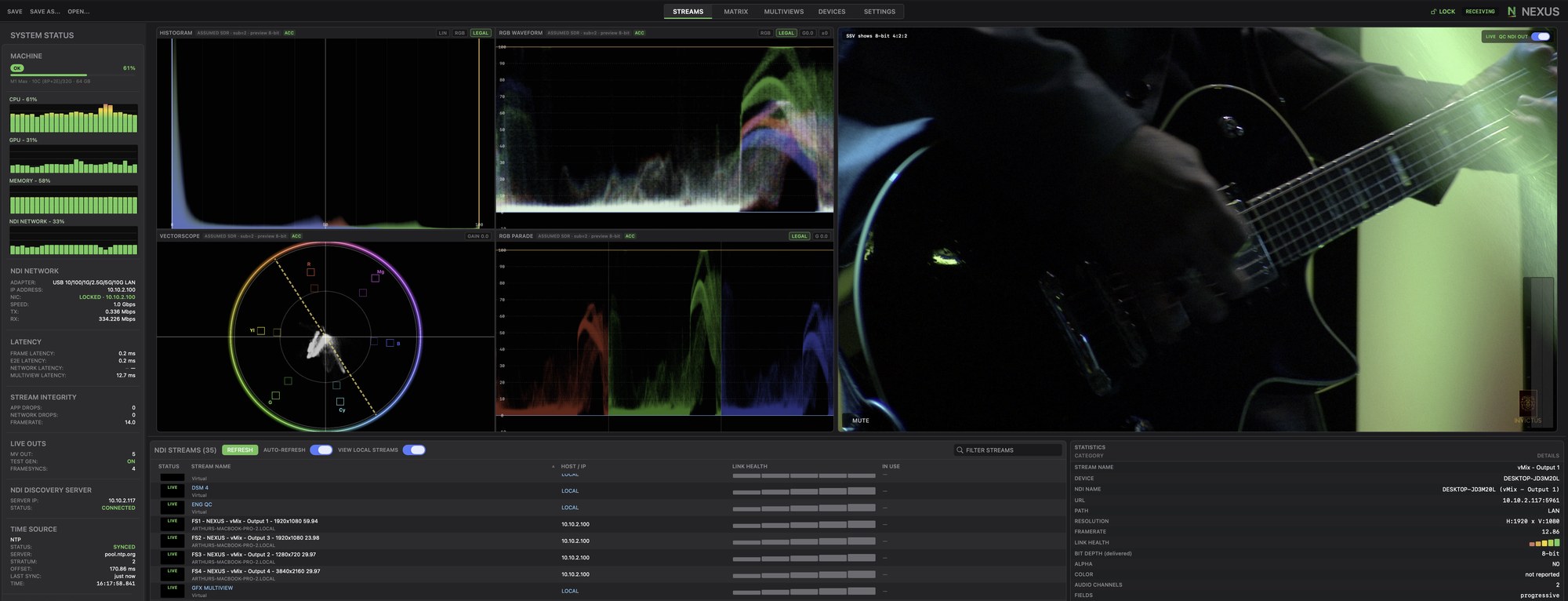
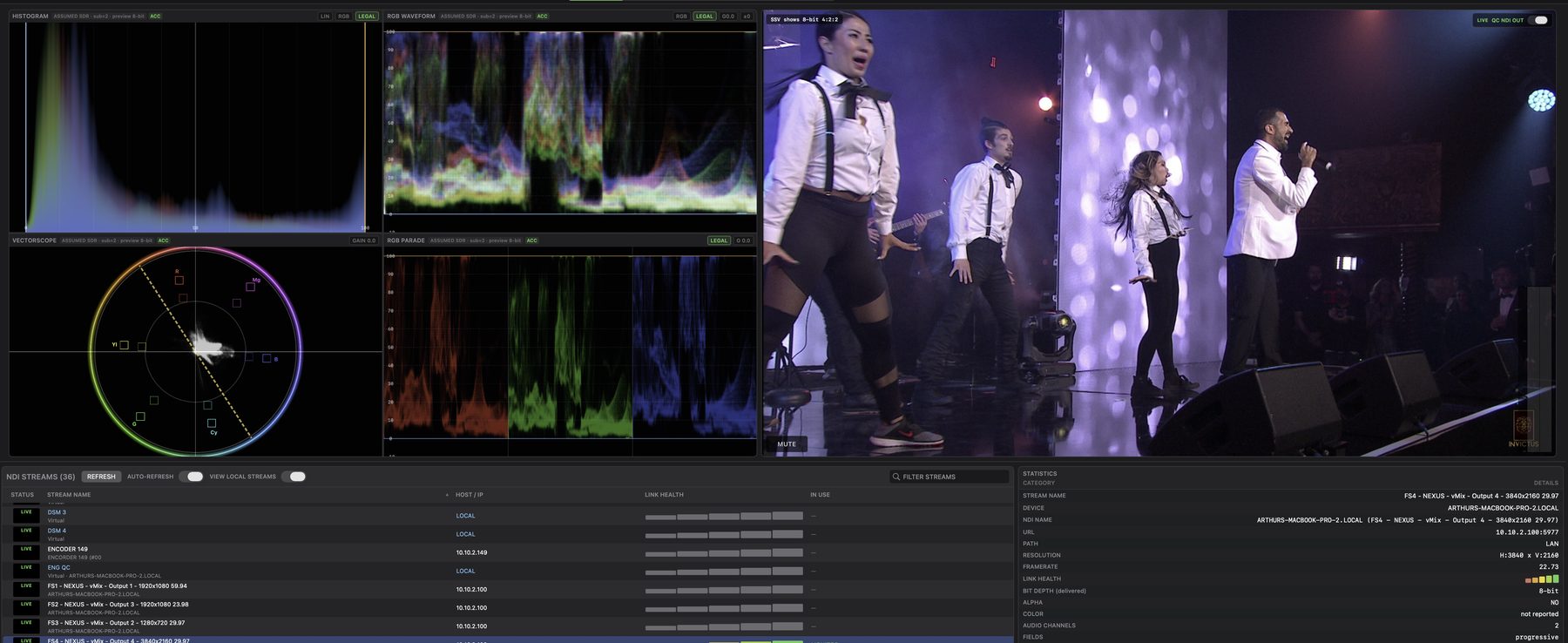
Nexus lists the NDI sources it finds on your network, with the status of each one, the host address, a link-health reading from this Mac and whether the source is being monitored or routed. Select a source and you get the live picture and audio meters next to the numbers an engineer actually checks: resolution, the declared frame rate against the frames actually being delivered, bit depth, colorspace, audio channels, source timecode and so on.
Matrix
TAKES. SALVOS.
FRAMESYNC.
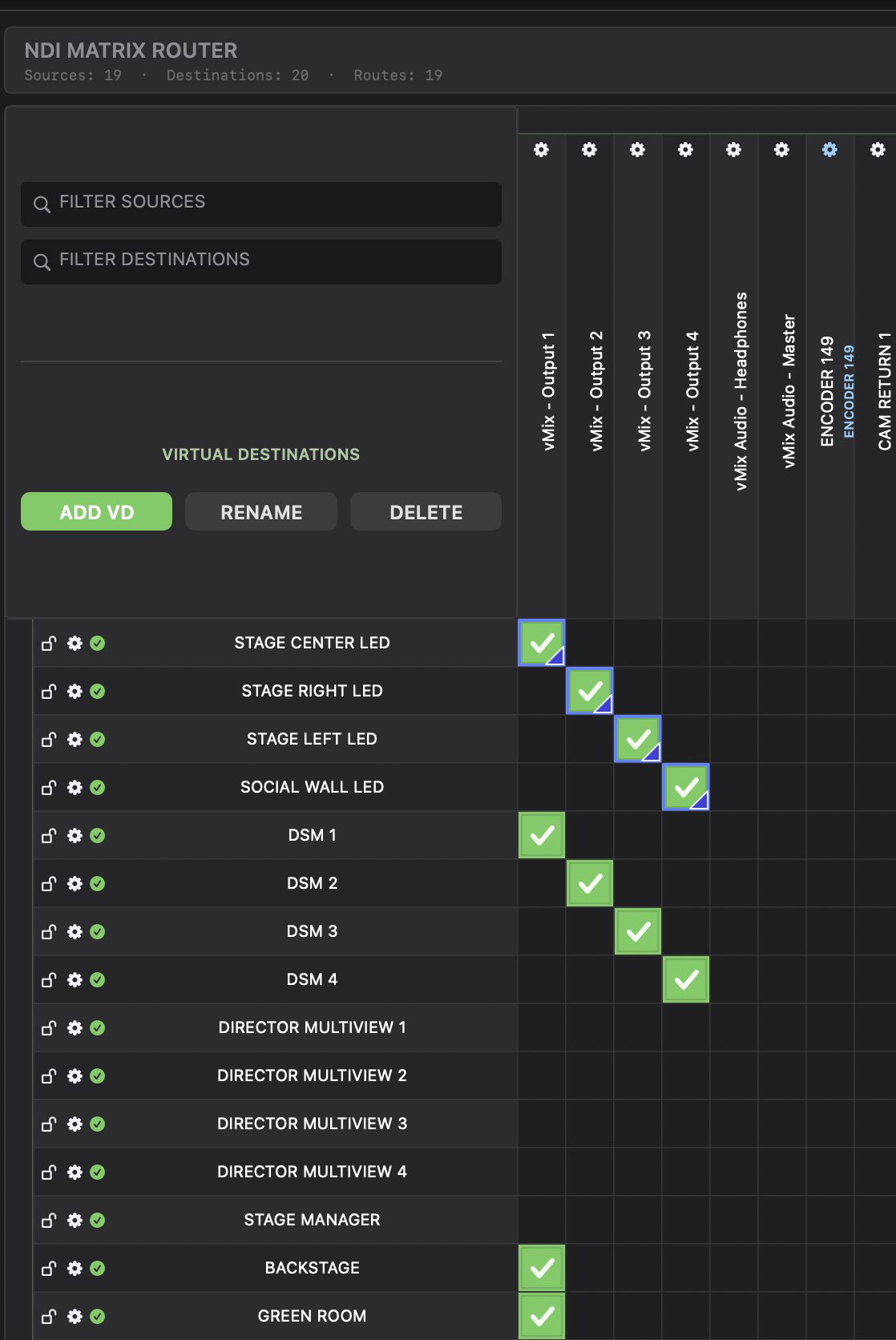
Execute takes on a crosspoint matrix with source and destination filters, keyboard takes and virtual destinations you create and name yourself. Salvos let you store, preview and take a stored set of routes in one action. Routes to network decoders are confirmed on screen and sent again when you load a show file or when a decoder returns from a network drop. When a destination needs a specific format, a framesync on that crosspoint converts what the destination receives to the resolution and frame rate you specify.
Decoder routing supports NDI receivers listed by an NDI Discovery Server.
Multiviews
CUSTOM MULTIVIEWERS.
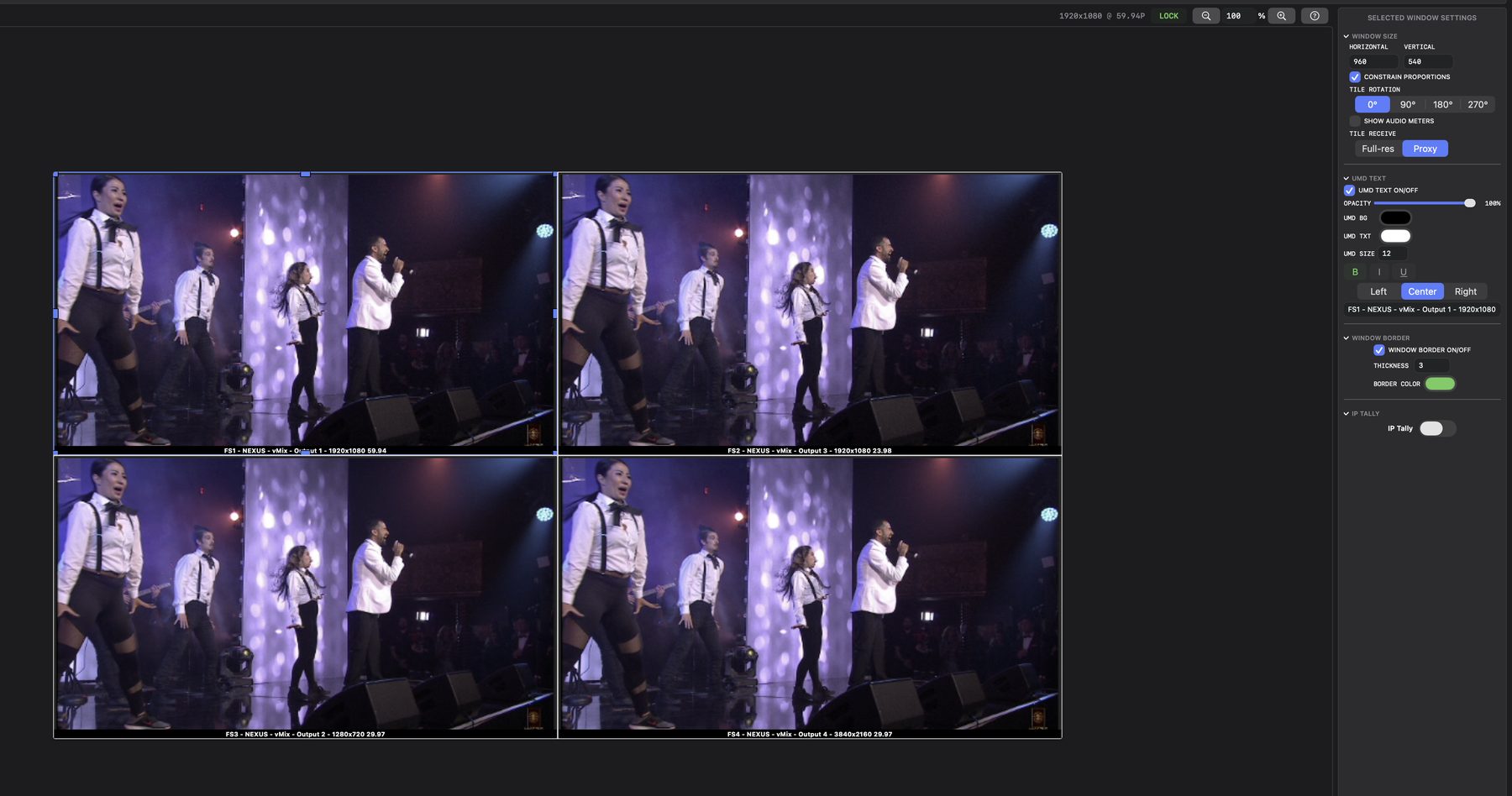
Build custom multiviewers from 720x480 up to 3840x2160, at 23.98p to 60p. Start from one of six layout presets or lay out your own, with UMD labels, borders, audio meters, tally borders, clocks with timecode, text boxes, safe-area guides and so on. Each layout is published as its own NDI output that NDI receivers on your network can pick up.
Devices · Analytics
A LIVE DEVICE INVENTORY.
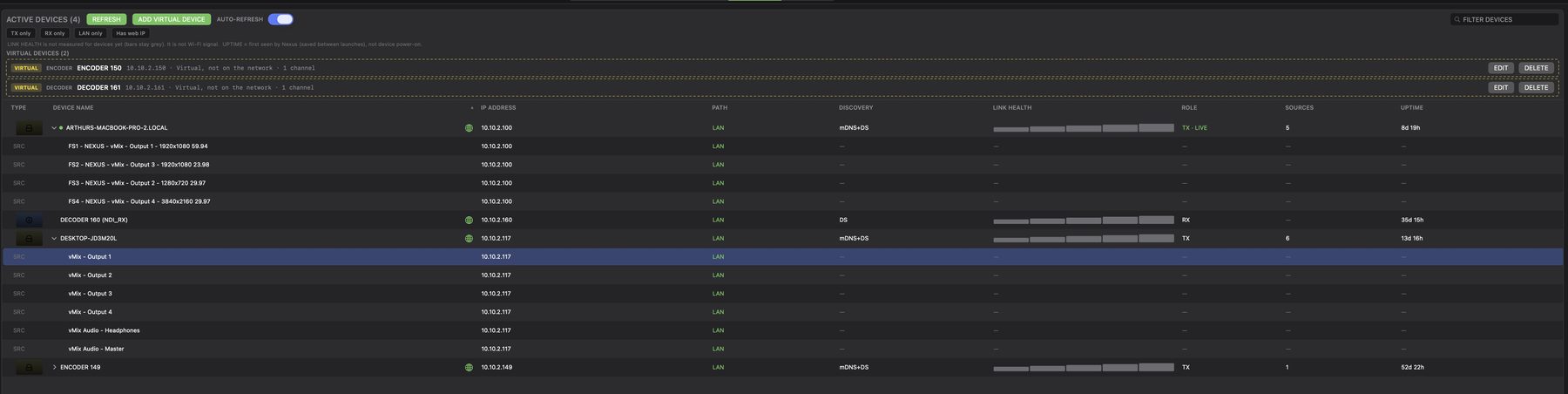
Nexus maintains a live inventory of the NDI devices it discovers, typically encoders and decoders, in one table, with the address, network path, how each device was discovered, its role, its source count and how long Nexus has known about it. Open a device's web page or copy its IP address in one click.
Streams · Scopes
CHECK THE PICTURE.
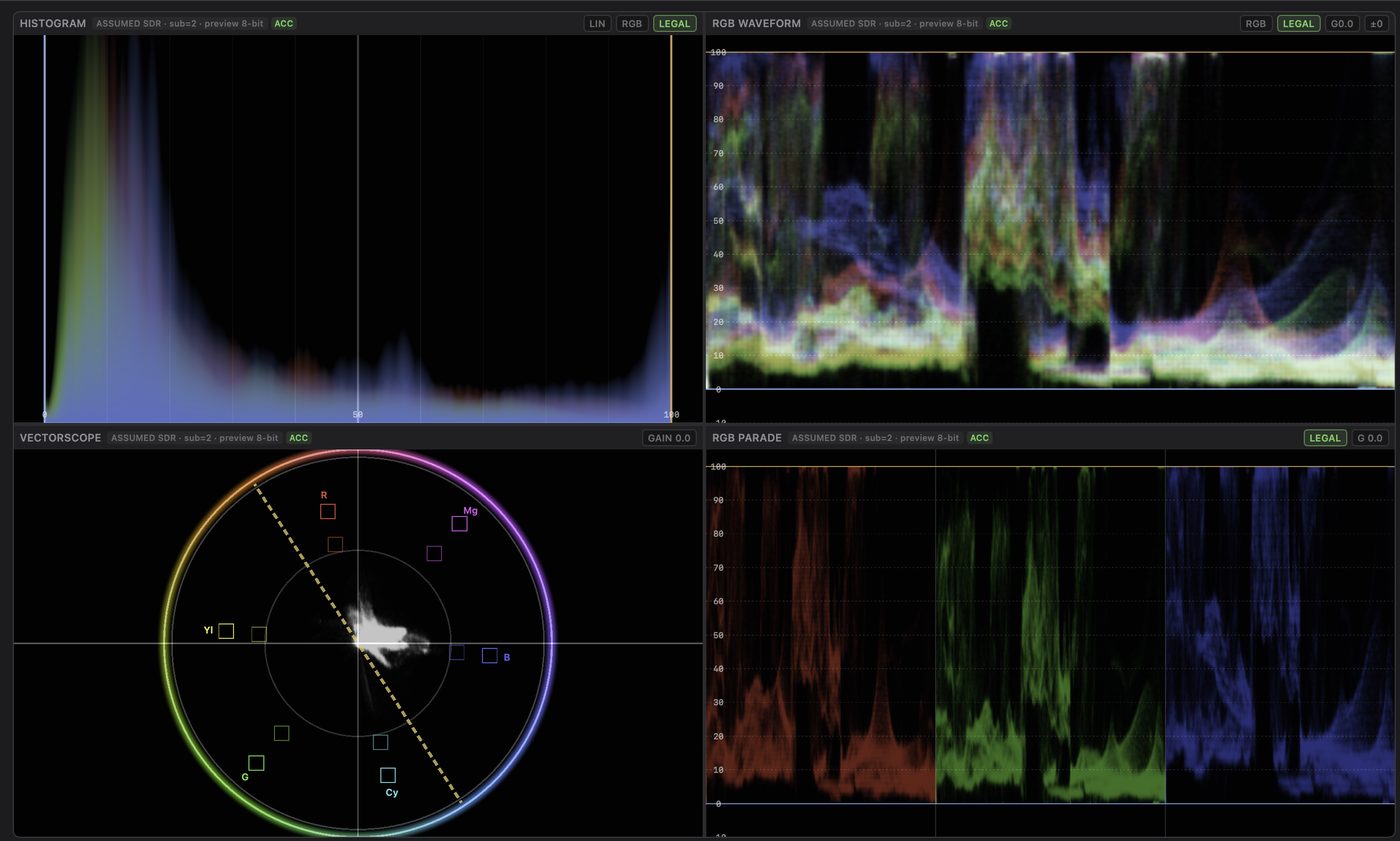
Scopes are part of the stream analysis: a luma or RGB waveform, a vectorscope with gain, an RGB parade and a histogram for the selected stream, with legal-range markers. They are there for quick confidence checks during a show without leaving Nexus, not as a replacement for calibrated test and measurement equipment.
Show safety
BUILT FOR SHOW DAY.
LOCK THE DESK. KEEP THE SHOW.
Because a show network can carry mission-critical sources and destinations, a passcode lock freezes the interface for a little peace of mind while NDI, multiview outputs, the built-in test generator and routes keep running. If the passcode is forgotten, you can unlock with your Mac login or Touch ID.
ONE SHOW FILE.
Save routes, salvos, framesync settings, multiviews, device names and settings in one show file, and load only the parts you need at the next venue.
TEST SIGNAL BEFORE CAMERAS.
The built-in test generator sends SMPTE color bars and tone at 720p, 1080p or 4K, so routing and displays can be checked before the cameras arrive.
Integrations
PLAYS WELL WITH OTHERS.
BITFOCUS COMPANION
Control over OSC: routes, salvos and source selection, with feedback.
Uses a second network adapter.
TALLY ON YOUR MULTIVIEW
From vMix, TSL UMD 3.1 or TSL UMD 5.0.
Display only. Does not drive camera tally.
NETWORK READY
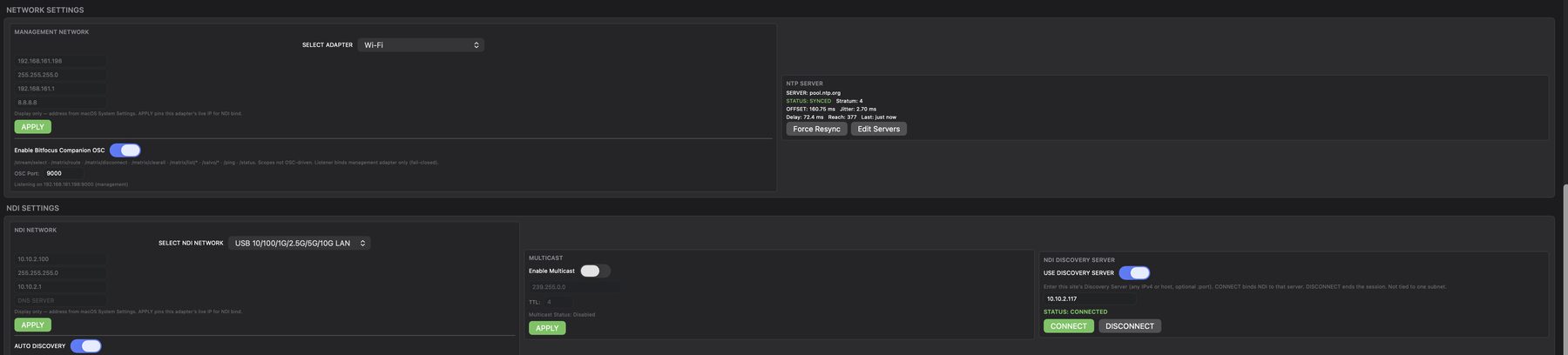
NDI Discovery Server support, a separate management network for control traffic, multicast and NTP time sync.
Who it's for
MADE FOR ENGINEERS,
BY ENGINEERS.
BROADCAST & STUDIOS
Engineers and technical directors who would rather have their sources, routes and multiviewers in one place than spread across several applications.
RENTAL & LIVE EVENTS
A fresh start on each new network, a saved show file for the next gig, and test signals on the wire before the cameras land.
SYSTEMS INTEGRATORS
Commission and hand over a system: check each device and its role, confirm decoder takes, and leave the client a saved show file and a locked desk.
HOUSES OF WORSHIP
Load Sunday's show, check your NDI cameras in one list, feed the overflow rooms, and lock the desk before service.
EDUCATION
Teach NDI routing, multiviewers and signal analysis on the Macs students already use.
STREAMING & ESPORTS
Monitor and route player cams and game feeds, and send multiviewers to the producers.
System requirements
WHAT YOU NEED.
| macOS | macOS 14 Sonoma or later |
|---|---|
| Mac | Apple silicon only. Intel Macs are not supported. |
| Network | Wired network connection recommended for NDI |
| Second adapter | Recommended. Required for Bitfocus Companion control. |
| Discovery Server | Needed to route to network decoders. Optional for monitoring. |
| Internet | Required to activate a license. |
| Language | English |
Pricing
ONE SEAT. EVERY FEATURE.
One license per Mac, with every feature included. No editions, no add-ons.
Founding offer. Use code FOUNDING at checkout on the Annual plan: $80.88 off your first annual payment, so one seat costs $399.00 for the first year. It then renews automatically at $479.88 per year until you cancel. First-time Nexus customers only. One seat per order. Redeem by Dec 31, 2026, 11:59 PM PT. Founding Offer Terms apply.
Save 20%
ANNUAL
$479.88/year
per Mac
$39.99/mo equivalent
- Save $120 a year compared with paying monthly
- One license per Mac
- All Nexus features included
- Renews yearly until you cancel
Annual $479.88/yr, billed once a year in advance.
Renews automatically until you cancel.
Cancel anytime.
72-hour refund on your first payment; renewals aren't refundable.
Flexible
MONTHLY
$49.99/month
per Mac
- Pay month to month
- One license per Mac
- All Nexus features included
- Renews monthly until you cancel
Monthly $49.99/mo, billed monthly.
Renews automatically until you cancel.
Cancel anytime.
72-hour refund on your first payment; renewals aren't refundable.
Prices are in US dollars. Taxes may apply. Cancel anytime: use Manage subscription in your receipt email or email support@invictusent.com. Promo codes apply to Annual only. The 72-hour refund is available once per customer. If you refund a Founding Offer purchase, the founding price is given up and can't be used again. Checkout and billing through Link. By purchasing you agree to the Terms of Sale and EULA. Privacy
Checkout and billing are handled by Link, LLC (a Stripe affiliate), our merchant of record. Your card statement will show LINK.COM*. Nexus is sold and licensed by Invictus Entertainment, LLC.
Need Nexus for a team or enterprise? Contact us about multi-seat or enterprise licensing.
Cancellation and refund terms: Terms of Sale
TRY NEXUS FREE
FOR 14 DAYS.
No credit card is needed. Download Nexus, open it, and the 14-day trial starts on its own.
Free for 14 days. No credit card or license key needed to start. After 14 days, Nexus needs a paid license to keep going.
macOS 14 or later · Apple silicon
Nexus asks you to accept the Nexus License Agreement the first time you open it. If you don't agree, don't use Nexus. Your use of Nexus is also covered by our Privacy Policy.
Documentation
- Operating Manual (PDF)
Setup and operation guide for Nexus.
- Release Notes (PDF)
What is in the current Nexus build, with known issues.
FAQ
QUESTIONS.
What is Nexus?
Nexus is an NDI® management app for the Mac. From a single window you can discover and analyze the NDI sources Nexus finds on your network, execute takes on a crosspoint matrix, framesync a destination to a specified format when required, build custom multiviewers and publish them as NDI outputs, and maintain a live inventory of the devices Nexus discovers. Scopes and audio meters are built in for checking a selected stream.
Who built Nexus?
Nexus was created by Arthur Khoshaba, a broadcast engineer and technical producer with more than 17 years in live events, broadcast television, film and remote production. He has worked as Engineer-in-Charge, technical director and Systems Integrator in studio control rooms, on mobile production trucks and at live venues, building signal flows across traditional baseband and new, cutting-edge IP-based workflows such as NDI® and SMPTE ST 2110.
In 2016 he founded Invictus Entertainment, LLC, a Los Angeles company that designs and engineers live and broadcast productions, from permanent installs to portable fly-packs. After years of managing NDI® networks with one application for discovery, another for routing, another for monitoring, and so on, he set out to build the one app he wanted in his own control room. Nexus went from planning and wire-framing through development and hundreds of hours of testing before release, and Invictus Entertainment develops and supports it today.
Is Nexus made by NDI?
No. Nexus is developed by Invictus Entertainment, LLC and is compatible with NDI. Learn more about NDI at ndi.video.
About NDI®
NDI® (Network Device Interface) is a video connectivity technology from Vizrt NDI AB. Learn more at https://ndi.video/.
Which Macs does Nexus run on?
Macs with Apple silicon, running macOS 14 Sonoma or later. Intel Macs are not supported.
Do I need two network adapters?
Nexus works with one. A second adapter is recommended so control traffic stays separate from NDI video, and it's required for Bitfocus Companion control. Nexus won't let you put both on the same adapter.
Do I need an NDI Discovery Server?
To route to network decoders, yes. Nexus lists and routes to the NDI receivers your Discovery Server reports. For monitoring sources, automatic discovery works without one.
Which decoders work with Nexus?
NDI receivers that your Discovery Server lists and that Nexus can discover. For questions about specific models, contact us.
What happens if I step away from the desk?
Lock Nexus with a passcode. The interface freezes, but NDI, multiview outputs, the built-in test generator and routes keep running.
How long is the free trial?
Try Nexus free for 14 days. No credit card or license key needed to start. After 14 days a paid license is required.
Is there more than one edition?
No. Every license includes every feature.
Does Nexus drive camera tally lights?
No. Tally from vMix or TSL is shown on your multiview tiles only.
Can I control Nexus from Bitfocus Companion?
Yes. Nexus has a built-in OSC server for routes, salvos, source selection and feedback. It listens on the management network adapter.
Compatible with NDI®
 NEXUS

Nexus is compatible with NDI®. Nexus is an independent product of Invictus Entertainment, LLC and is not affiliated with or endorsed by Vizrt NDI AB.
NDI® is a registered trademark of Vizrt NDI AB. Learn more at https://ndi.video/.